
Can one blog post rank for multiple keywords? (beginner wordpress seo guide)
Introduction
One of the biggest beginner myths in SEO is this:
“One blog post should target only one keyword.”
If that were true, ranking would be extremely limited.
Yet when you open Google Search Console for almost any well-optimized page, you’ll notice something interesting:
That single page ranks for dozens, sometimes, hundreds of related keywords.
So the real question isn’t:
Can one blog post rank for multiple keywords?
The real question is:
How do you structure your content so Google understands multiple keywords without keyword stuffing?
In this beginner WordPress SEO guide, you’ll learn:
- Whether a page can rank for multiple keywords
- What primary vs secondary keywords really mean
- How Google understands related search terms
- How to optimize your WordPress blog for multiple keywords
- A real example from my own WordPress On-Page SEO Checklist blog
The real confusion beginners have about keywords
Most beginners believe:
- One page = one keyword
- Adding more keywords = keyword stuffing
- Google penalizes multiple keyword targeting
This confusion happens because traditional SEO advice focused heavily on “exact match keyword targeting.”
But modern SEO works differently.
Google doesn’t rank pages for just one keyword.
It ranks pages for topics.
If your blog clearly covers a topic, Google may rank it for:
- The primary keyword
- Related variations
- Question-based queries
- Long-tail phrases
- Semantic keyword combinations
so yes. One blog post can rank for multiple keywords.
But only if structured correctly.
Can one blog post rank for multiple keywords?
Yes.
A single blog post can rank for multiple keywords if:
- All keywords share the same search intent
- The content naturally covers related subtopics
- You structure headings properly
- You avoid keyword stuffing
- You focus on topic depth, not repetition
Google today uses semantic understanding.
It connects:
- Primary keyword
- Secondary keywords
- Related phrases
- User intent
into one topical cluster.
How google actually understands multiple keywords
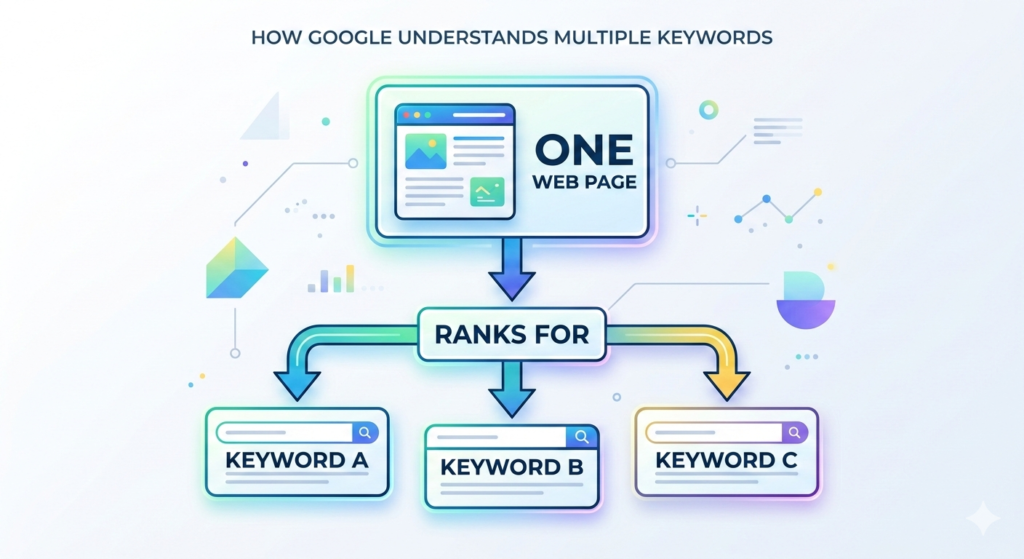
Google does not look at your content and say:
“This page has used the keyword 12 times.”
Instead, Google analyzes:
- Context
- Semantic relevance
- Heading structure
- Internal linking
- Topic coverage
For example:
If someone searches:
- Can one blog post rank for multiple keywords
- How many keywords should a blog post have
- Primary vs secondary keywords in SEO
Google understands these are related queries.
If your article answers all of them clearly, it may rank for each variation.
This is why “multiple keywords in one blog post” is not a problem.
The problem is mismatched intent.
Primary vs secondary keywords explained clearly
To optimize a blog for multiple keywords, you must understand this structure:
Primary Keyword
The main topic you want to rank for.
In this article, the core phrase is:
Rank for multiple keywords
or question variation:
Can one blog post rank for multiple keywords?
Secondary Keywords
Closely related variations that support the main topic.
For example:
- How many keywords should a blog post have
- Primary vs secondary keywords
- Optimize blog for multiple keywords
- Can a page rank for multiple keywords
Secondary keywords:
- Support the main topic
- Share the same intent
- Expand coverage
- Do not change topic
What You Should Not Do
Do not mix:
- “Rank for multiple keywords”
with
- “How to start a dropshipping business”
Different intent = different article.
REAL EXAMPLE USING MY WORDPRESS ON-PAGE SEO CHECKLIST BLOG

Let’s look at my article:
WordPress On-Page SEO Checklist
The primary keyword was:
WordPress on-page SEO checklist
But that page can also rank for:
- WordPress on-page SEO steps
- On-Page SEO before publishing
- Rank Math on-page SEO checklist
- WordPress blog SEO checklist
Why?
Because all of these share the same intent:
On-page optimization in WordPress before publishing.
I did not write separate articles for each small variation.
Instead, I structured one comprehensive article covering the topic properly.
That’s how one blog ranks for multiple keywords.
How to optimize a blog to rank for multiple keywords
Now let’s make this practical.
Step 1: Choose One Primary Keyword
Start with one clear main keyword.
Example:
Rank for multiple keywords
Everything in the article revolves around this concept.
Step 2: Identify Related Secondary Keywords
Use:
- Google autocomplete
- People Also Ask
- Related searches
- Ahrefs free tool
Look for phrases that share intent.
Do not look for random keywords.
Step 3: Map Keywords to Sections
Instead of stuffing keywords randomly:
Assign them logically.
Example:
- H2: Primary vs Secondary Keywords
- H2: How Many Keywords Should a Blog Post Have?
- H2: How Google Ranks Pages for Multiple Keywords
Each section targets a variation.
This is keyword mapping for beginners.
Step 4: Optimize Placement
Place primary keyword:
- In H1
- In Introduction
- In one H2
- Naturally throughout
Place secondary keywords:
- In H2 or H3 headings
- Inside relevant sections
- In FAQ
Never force repetition.
Step 5: Support With Internal Linking
For example:
After explaining keyword structure, link to:
Related articles in your blogs.
This strengthens topical relevance.
How many keywords should a blog post have?
This is the wrong question.
The better question is:
How many keywords share the same intent?
There is no fixed number.
Some pages rank for:
- 5 keywords
- 20 keywords
- 100+keywords
If they all relate to the same topic.
Focus on topic coverage.
Not keyword count.
Common mistakes when targeting multiple keywords
Targeting Different Intent Keywords
Do not combine:
- “Rank for multiple keywords”
With
- “How to increase website traffic fast”
Different goals.
Keyword Stuffing
Repeating the same phrase 20 times does not help.
Google understands context.
Ignoring Structure
If your headings are messy,
Google struggles to understand topical hierarchy.
Writing Separate Thin Articles
Instead of writing 5 thin posts:
Combine related keywords into one strong guide.
Frequently asked questions
Should I target more than one keyword per page?
Yes, if they share the same search intent and topic relevance.
What is a primary keyword in SEO?
The main keyword that defines your article’s core topic.
What is a secondary keyword?
Closely related variations that support and expand the primary keyword.
Can a blog rank for related keywords automatically?
Yes. If your content covers the topic deeply, Google may rank it for related variations without explicitly targeting them.
How to structure content for multiple keywords?
Use clear H2 sections for each related concept and maintain topical consistency throughout the article.
Conclusion
So, can one blog post rank for multiple keywords?
Yes.
But not because you force it.
It happens when:
- You choose a clear primary keyword
- You include related secondary keywords
- You structure content logically
- You focus on topic depth
- You avoid mixing different intents
SEO today is not about targeting one keyword per page.
It’s about building topical authority.
And when done correctly, one well-structured WordPress blog post can rank for many relevant search queries.
If you’re new to SEO strategy, start with this guide on Digital marketing basics for beginners to understand how everything connects.
Optimize intelligently.
Structure clearly.
And let semantic relevance work in your favor.