
WordPress on-page seo checklist: a complete guide for beginners before publishing
Introduction
More than 90% of WordPress blog posts fail to rank on the first page of Google.
Not because the content is bad.
But because basic On-Page SEO steps were never properly implemented before publishing.
- Titles are not optimized
- Meta descriptions are missing.
- Headings are poorly structured.
- Internal links are ignored.
The Real Problem Beginners Face:
- How to do On-Page SEO in WordPress?
- How to check SEO on WordPress?
- What’s included in On-Page SEO?
- What are common On-Page SEO mistakes?
The issue isn’t effort, it’s lack of a clear system.
Without a proper WordPress On-Page SEO checklist for beginners, most blog posts miss critical optimization elements.
On-Page SEO includes:
- Title optimization
- Meta description
- Clean URL structure
- Proper heading hierarchy
- Keyword placement
- Internal linking
- Image optimization
- Readability improvement
Missing even a few of these can reduce ranking potential.
Why this WordPress on-page seo checklist works
On-Page SEO is one of the most important part of digital marketing. If you’re new to the concept, you can first understand the basics in my Digital Marketing for Beginners – Basics, Channels & How it really works guide.
This is not a random checklist copied from multiple blogs.
This guide focuses specifically on:
- WordPress implementation
- Practical On-Page SEO steps
- Beginner clarity
- Pre-publishing optimization
Instead of overwhelming you with advanced technical jargon, this checklist focuses on real actions that improve search visibility.
If you’re looking for structured WordPress On-Page SEO steps, this guide keeps it simple and actionable.
How to do on-page seo in wordpress the smart way
Before diving into detailed steps, understand this:
On-Page SEO before publishing WordPress content should follow a logical flow.
Here’s the smart approach:
- Optimize structure first
- Optimize metadata second
- Improve internal connections
- Review and refine before publishing
Now let me break it down clearly.
The complete wordpress on-page seo checklist
Optimize your blog title (h1)

Your H1 should:
- Include your primary keyword naturally
- Be clear and readable
- Avoid keyword stuffing
Only one H1 per page.
Your WordPress theme usually assigns the H1 automatically. Do not add another H1 inside Elementor.
This is the foundation of any On-Page SEO checklist WordPress blog should follow.
Optimize your SEO title (Rank Math Setup)
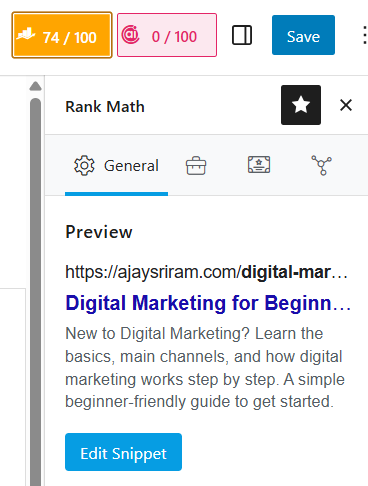
Your visible blog title and SEO title can differ.
Inside Rank Math:
- Open Edit Snippet
- Place primary keyword near beginning
- Keep it under 60 characters
- Add clarity or benefit
If you’re using Rank Math, this step forms part of your Rank Math On-Page SEO checklist.
Write a compelling meta description
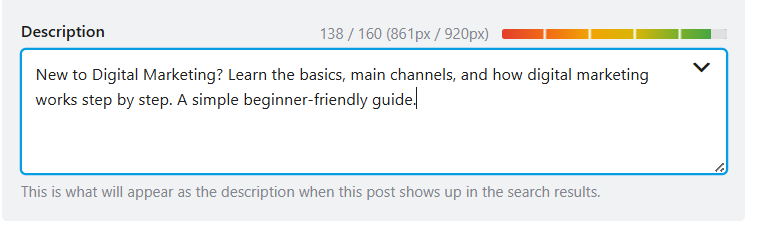
Meta descriptions don’t directly rank your page.
But they improve click-through rate.
Checklist:
- 140 – 160 Characters
- Include primary keyword naturally
- Add benefit-driven explanation
- Avoid stuffing
Meta clarity improves user engagement.
Optimize URL SLUG
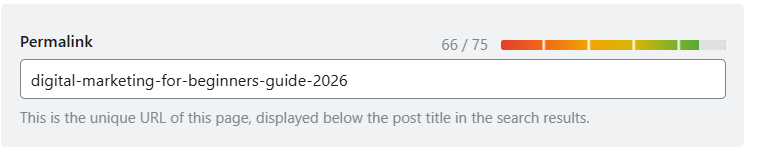
Keep your URL clean and short:
wordpress-onpage-seo-checklist
Avoid long slugs with unnecessary words.
Clean URLs improve crawlability and clarity.
Use proper heading structure (H2, h3)
Structure should follow hierarchy:
- H1 – Main title
- H2 – Major sections
- H3 – Subpoints
Avoid skipping levels randomly.
Clear heading structure is part of what’s included in On-Page SEO.
It helps both users and search engines understand content flow.
Add internal links before publishing
Internal linking is one of the most ignored WordPress On-Page SEO before publishing steps.
Before publishing:
- Add at least one contextual internal link
- Use descriptive anchor text
- Link to relevant SEO-related articles.
Internal links improve:
- Crawlability
- Topical authority
- Page relationship
Optimize images properly
Before uploading:
- Rename image file
- Compress file size
- Avoid large image dimensions
Inside WordPress:
- Add clear alt text
- Keep it descriptive
- Avoid keyword stuffing
Image optimization improves both SEO and page performance.
Check keyword placement naturally
Your primary keyword should appear:
- In the title
- In the first 100 words
- In at least one subheading
- Naturally throughout content
If you’re wondering whether one article can target more than one keyword effectively, read this guide on how one blog post can rank for multiple keywords.
Do not force repetition.
Keyword stuffing is one of the most common On-Page SEO mistakes.
Review readability and formatting
Short paragraphs.
Clear spacing.
Simple language.
Even perfect SEO fails if users leave quickly.
User experience supports ranking indirectly.
Final SEO REVIEW BEFORE PUBLISHING
Open your SEO plugin and check:
- Focus keyword placement
- Meta data
- Internal links
- Image alt attributes
- Readability suggestions
Remember:
Plugins guide you.
They do not guarantee ranking.
Common On-Page SEO MISTAKES TO AVOID
- Multiple H1 tags
- Overusing keywords
- Ignoring internal linking
- Publishing without meta description
- Using long messy URLs
- Relying only on SEO score
Avoid these mistakes strengthens you overall WordPress On-Page SEO strategy.
Frequently asked questions
How to do ON-page seo in wordpress?
Follow a structured checklist: Optimize title, meta description, URL, headings, internal links, images, and review everything before publishing using an SEO plugin.
How to check seo on wordpress?
You can check SEO using plugins like Rank Math or Yoast SEO. They analyze keyword placement, readability, and metadata before publishing.
Which seo tool is best for wordpress?
Rank Math and Yoast SEO are popular options. Rank Math offers advanced features in its free version, making it beginner-friendly.
What's included in on-page seo?
Title tags, meta descriptions, clean URLs, heading structure, keyword placement, internal linking, image optimization, and content readability are core elements.
What are common on-page seo mistakes?
Keyword stuffing, duplicate H1 tags, ignoring internal links, missing meta descriptions, and publishing without reviewing SEO settings are common mistakes.
Conclusion
On-Page SEO in WordPress does not require complicated strategies.
If you follow this structured WordPress On-Page SEO checklist before publishing every blog post, you build strong foundational SEO signals consistently.
Ranking is not about doing one big thing.
It’s about doing small things correctly every single time.
Optimize.
Review.
Publish confidently.
And repeat the process for every WordPress blog you create.